








Versioning
Contents
Every time you update an endpoint's query, PostHog creates a new version. This gives you a history of changes and lets you run older versions if needed.
Why versioning exists
Versioning helps you:
- Safely update queries - If a change breaks something, you can still access the previous version
- Debug issues - Compare results between versions to understand what changed
- Gradual rollouts - Test a new query version before fully switching over. (Tip: you can use feature flags to roll out a new version to a subset of your users)
How versioning works
When you save changes to an endpoint's query, PostHog automatically creates a new version. The version number auto-increments (1, 2, 3, etc.) and the previous versions remain accessible.
An endpoint version is a snapshot of the version's query at a point in time. However, you can change a version's description, caching and materialization behavior.
You can see all the versions and their configuration in the Versions tab of your endpoint.

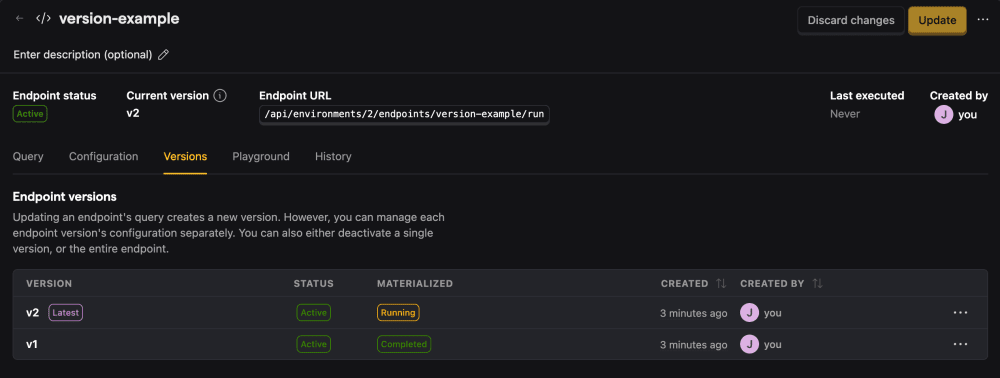
From here, you can click on a version number to view that version, which will show the insight or SQL query and that version's configurations.
To update the query and create a new version, you'll first have to go back to the latest version.
Running a specific version
By default, executing an endpoint runs the latest version.
To run an older version, pass the version parameter as a query string or in the request body:
Disabling a version
If you'd like to make sure a version is no longer accessible (for example, if the query contains an error), you can disable a version by:
- navigating to the Versions tab,
- clicking on the three dots on the right of the version you'd like to disable,
- and clicking
Deactivate version.


Deactivating a version is different from deactivating an endpoint.
The former only makes requests to the specific endpoint version inaccessible, while the latter does that to the whole endpoint and all its versions.
Versioning and materialization
Each version can be materialized independently, as long as the underlying query allows it.
To change a version's materialization:
- Click on that version in the Versions tab,
- Turn materialization on/off in the Configuration tab.